What a pain! I recently reinstalled Ubuntu 11.10 on my Dell Latitude D630 and wireless wasn't working. It wasn't picking up any connections. My driver BCM4312 802.11b/g LP-PHY for some reason wasn't installed and when I went to Ubuntu "System settings->Additional Drives" and tried to activate the Broadcom STA wireless driver I would get an error to check /var/log/ folder that didn't exist.
So I connect to the internet using a wire connection and ran this in the terminal
$ sudo apt-get install b43-fwcutter
rebooted the computer then went back to "System settings->Additional Drives" tried to activate the driver again and it worked.
Resources:
https://help.ubuntu.com/11.10/ubuntu-help/net-wireless-troubleshooting-device-drivers.html
http://askubuntu.com/questions/95852/how-to-fix-bcm4312-driver-problem
https://www.evernote.com/shard/s18/sh/d245d647-45aa-474d-b093-a6346c7e9e27/e56bca9b17d774858fb6900cd302d047
Showing posts with label Hardware. Show all posts
Showing posts with label Hardware. Show all posts
Tuesday, February 7, 2012

Tuesday, June 28, 2011
Windows Microphone doesn't work
Recently I've been having issues with my computer microphone both in linux and windows. I solved the linux problem now here is the windows.
Note: I recently installed a new operating system
Note: I recently installed a new operating system
One of the reason why your microphone isn't working is because "Realtek High Definition Audio" drive isn't installed.
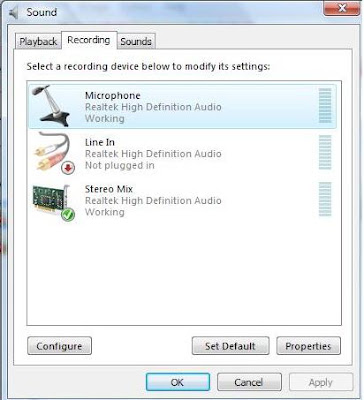
What we need to do is install Realtek High Definition Audio. Click here to install (Vista and Windows 7)
When dowloaded extract it with winrar.
Then open the extracted folder and click "Setup" icon.
Once your computer reboots the microphone will start working.
Make sure all other setting are configured like the volume and the microphone is plugged in.
Any questions leave it in the comments
Saturday, June 18, 2011
Brand New Computer for $50
I owned many computers and all of them had the same fate. After 2 years it became very slow to the point where I needed to delete all the memory and reset to factory settings. The computer did run faster but it would get slow again in half of the time when I first bought it. Eventually I was forced to buy a new computer because resetting wasn't resolving the problem.
Here is what I discovered. Older technology is not the main reason why your PC slows down its the internal hard drive. Consider your hard drive like your breaks in your car. The more you use it the worse it gets.
You want a brand new computer? Change the internal hard drive (you will need to install an operating system). You can buy new one 500gb for $49. Click here to see the one I bought.
Here is what I discovered. Older technology is not the main reason why your PC slows down its the internal hard drive. Consider your hard drive like your breaks in your car. The more you use it the worse it gets.
You want a brand new computer? Change the internal hard drive (you will need to install an operating system). You can buy new one 500gb for $49. Click here to see the one I bought.
Saturday, May 14, 2011
Running 2 hard drives
Running two hard drives is easy. What's needed is connecting an extra hard drive on your motherboard. It can be either a SATA and or a IDE connection. Once the new hard drive is plugged in (the motherboard automatically detects it) enter into your computer BIOS and change the boot order.
The BIOS software is built into the PC, and is the first code run by a PC when powered on, access by pressing a specific key when the computer boots up, before the operating system is loaded .
Usually the original hard drive is listed first. Change the boot order so the new hard drive is listed as first boot, make sure an operating system CD is insert and reboot the computer. Once the computer restarts the new hard drive will boot and the operating system will install.
To change back to the old hard drive go back to BIOS and change the boot order.
If any question leave a comment.
Subscribe to:
Posts (Atom)